
For a long time I have continually raved about what I think is a severely under-used Cool Flickr Feature- the ability to add notes, or hypertext regions to images. For many long, winter nights, I have wondered.. Why Dont Teachers Jump All Over Such a Thing?, but alas, gave up on hearing an answer from the mountain.
Just on a whim today- my colleague Joe Lamber asked if I knew of a web tool that allowed one to annotate any image with a push pin and a note like Google does for the maps, that I came across a holy grail I never knew existed- Fotonotes – code that provides any web site the ability to add this feature to image content:
FotonotesTM is an [sic] standard, specification, and collection of scripts for annotating images.
And towards the bottom, it is credited as the inspiration for the early flickr-ites to create their own feature.
Too outline it in pictures:
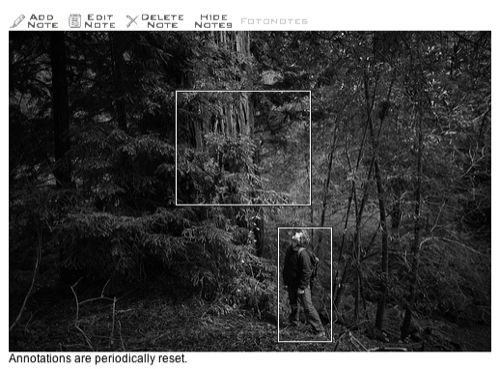
A photo is dedined with the rollover hotspots.

And upon rollover, you get a pop up note. Yep. Just like flickr.

So you can also edit a note, in this case, I am adding one for the tree.
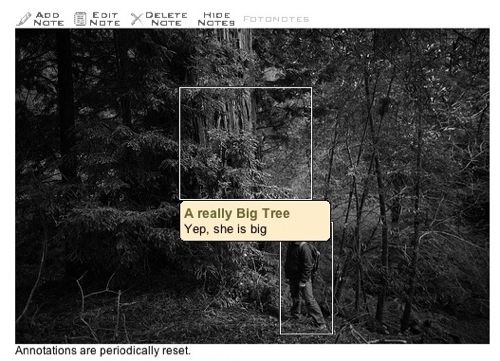
And voila! It is there.
I have no idea yet what it takes to tun this code, and I don’t have an immediate use for it, but its one of those things I hope to tag and file away for that one day when such a need is going to jump up and bite me.
Is there something I am missing in all my excitement?


Great. I am glad that you published this.
I had noted this effect on someone’s blog the other day and i thought..hmm could you do that. That would be really useful. So now I know.
Thanks
About the Flikr notes. I like them but you cannot export the pictures with the notes. So, I would have to link every image I show up to Flickr, which is blocked by websense, by the way.
The feature is nice for some activities but like I said, you’ve got to be able to take the annotation with you for it to be of real value for my classroom.