
File this in the overly generalized, crass, and no one really gives a flying hoot blog category (everyone has that category, no?). The bulk of anything I would put on a plastic pedestal called “career” boils down to this:
Looking **** up.
This came to me within my first few years of being a so-called “instructional technologist” at the Maricopa Community Colleges (actually the title was less glorious– “programmer analyst, instructional systems”), dial the time machine back to the mid 1990s. I was deep into the glory optimised era of the web. Working at a central department in a large distributed education system (10 independent colleges), internally I guess I got to be known as the guy to ask edtech questions. My time interacting with people n this system was largely:
- Someone calls me on the phone (this was actually qute common) or sends a VAX mail. message asking if I an tell them anything about a tech tool or suggest something for their subject area.
- Reply “Let me get back to you”
- Spend time doing my one trick pony act — I call it– wait a minute, there is jargon — “Looking Shit Up on the Internet”
- Call or VAX Mail back a summary
It was just reflexive, and for some reason, people thought I was knowledgable or knew this stuff. That’s pretty much been the bulk of not only my career but also my interactions. It makes you look knowledged on your blog, in some bird theme messaging platform, well almost anywhere you communicate or interact with people.
And DOH sez Homer, so is everyone else. I have friends and colleagues that seem to have this savvy depth, they can recall exact concepts from literature, the full song lyrics from 20 yeat old songs, quotes from obscure films– I am always looking shit up. I barely remember pop culture references, and often have to look things up to reply to social media threads.
But I don’t care that I am not a walking talking Wikipedia. And quite the opposite- I crave looking things up. Obscure things. Or finding things when I have just a vague memory shred. Or all my stuff chasing microfacts from old public domain images.
I love the search, the chase, the zig zags. The dead ends that. need refines. But if I do anything, maybe I’d like to think I am okay with explaining it to the person that asked me. It’s not enough to click a button to get an answer, but to sort through all the answers and recast it to them in a way I sense is best giving what I know about them.
ZOMG I am confessing I do what Generative AI does?

The best part really is that in the search to fid answers for others, I nearly always observe bits myself, not all of them stored in the grey matter, but tucked away as a clue. But what’s always the treat is when I discover something else along the way that has nothing to do with my goal. It’s like hoovering up bits of extra knowledge as a by product of something else.
I blab.
This blog post is no personality crisis of identity and worth (well those are every day incidents) but something more mundane- rotating images on. Mac.
You see I am well versed in those situations where I have a photo, often from the iPhone, that I end up having on my Mac (also sometimes they come as stuff sent to me), that are images that are turned 90º from the orientation I need them. I know just from frequent repeat the quick and easy approach is dropping the icon into the quietly versatile Preview app, and going to the tools (or when I remember command-L or command-R) to do a quick rotation left of right (in many photo editing apps like Lightroom, it is command-[ ot command-]).
This is the stuff I do so often there of course is no lookup.
But today I am watching Cori’s daughter who is visiting us do her research work. Jessy Lee is a historian, and she has thousands of photos taken of handwritten journal entries, all taken from her visits to archives. The standard tool she uses is an iphone or maybe a compact digital camera. Each photo is like a sentence or two in handwritten documents likely over a hundred years old.
And I am watching her occasionally rotate her Macbook 90 degrees, so I asked what she is doing. Jessy Lee explains that many of the photos are rotated, and yes, she know how to open in Preview and manually rotate. But the way she is working is from her desktop director of hundreds of images in the OSX Gallery view, as she just needs to read each nad written note scanning for some key information.
This is a crude simulation of what is happening (using my own photo directory).
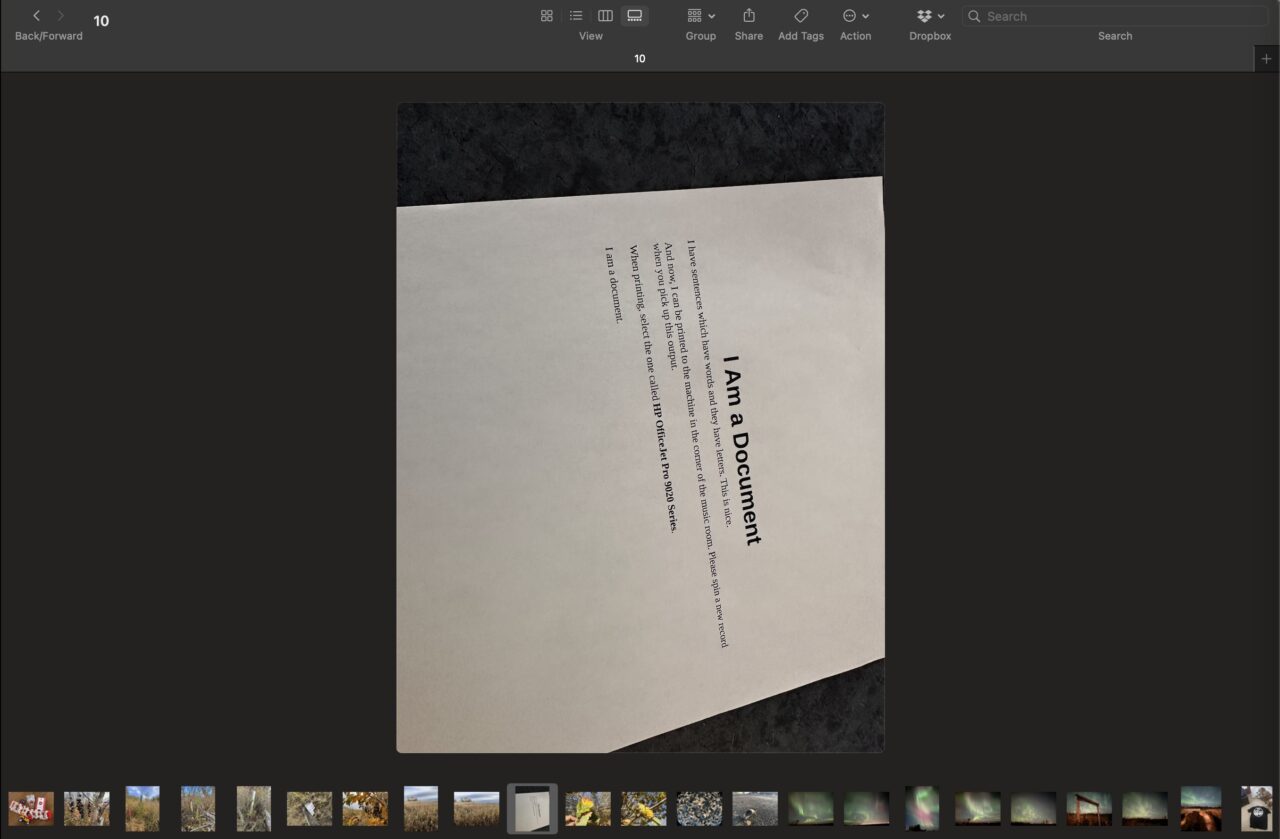
Again, they could be rotated, but she needs to just scan hundreds of them in a session, and opening i Preview, rotating and returning, well I can see why it interrupts her flow, and as well, why maybe in the interest of time, one might turn the machine to read a once sentence document.
So me, Mr I Have Used a Mac Since Steve Jobs Had Pimples (I stretch the truth), I do not know if it is possible to do a quick image rotation from the desktop. I reach for my One Trick, and ask The Google “os x rotate image from finder”
There’s a spray of results which of course is what the damn thing tries to do in the generated summary. I see the Preview trick I know, and other suggestions for creating actions to rotate folders of files (not the task), and apps to download and try/buy.
But there is it is amongst the chaff, and amazing and useful Mac Trick that I bet tons of other people will scream OF COURSE EVERYONE KNOWS THAT, was sitting there ll the time and i never know. The say shortcut for the menu items in preview, command-L or command-R works on an image file selected in the Mac finder.
Holy cow! It’s a game changer for Jessy Lee, and for me it slides quickly into the stuff I did not know to the stuff I will cause I will use it.
And I get to flaunt what a non-Expert I really am.
Again, I am getting all revved up and spending a good chunk of an blabbing when I could be listening to Classical Music or reciting Chaucer to write about something that is insanely obvious. You will scream that this should be the featured image:

Hey this is my blog and I am glad to fill it with flaff that you will eye roll me. Go ahead.
But this whole little tiny act today of finding just by poking around the internets, something really simple and obvious and useful, well, its the thing that jas jazzed me about the web since I first popped in my Mac Quadra 900 that floppy disk with the handwritten word Mosaic on it.
If you cannot be excited about finding stuff, well, ummm, welll, okay.
Featured Image: Screen shot of the search field on this here old blog. Yeah share this as CC-WTF.



The thrill of the search is matched only by the deep satisfaction of the sharing. You’re a natural born teacher.
Brilliant, #til Command-L and Command-R from the Finder. Will use most definitely every chance I get. And I’m right there with you unseen maybe sometimes passing through the very same websites, on consequential journeys receiving tangential information. Then occasionally spending hours on Wikipedia reading and following footnotes (when the resources are available). This algorithm of looking stuff up works. It’s literally the only skill I bring to the table.
?-L & ?-R are now fixed in my brain because you wrapped them is a story.
Previously if I was batch rotating I’d: open the terminal; man sips (because I’ve forgotten the details); then run the command. This is a great improvement.
Looking stuff up, trying it out, passing it on. That is a great job. For a few years I supported schools in what was then called ict. Some of the best parts of the job were exactly that.
It seems like a beautiful post to me and mirrors many of my own feelings about this work.
I’m not a programmer. I don’t love technology. I just happen to be stubborn and decent at searching. I like solving problems and figuring things out to help people (not for productivity’s sake, but simply to avoid drudgery or enable new possibilities).