
I’ve done a handful of web projects this year where it made sense to store data in Google Spreadsheets, and then use a bit of PHP code to make them be dynamically displayed on a web site. In many cases, these are tables of data that are parsed and presented nicely in the web site, but for a few NMC projects, it made sense as a way for a staff person to update data on our web pages w/o having to touch the pages.
As a first example, I am cleaning up an older WordPress site I use for logging my running/training; in the past, I kept a spreadsheet on my desktop for keeping a run log and then manually transferred the totals/averages/graphs to my web site by pasting into some text files (they are embedded with a PHP include). It worked, but it did have that tedious manual smell for something that should be more automated.
It seemed to make sense to transfer the spreadsheet to a Google Doc. I’m not going to detail all the bits in there, but essentially, for every run, I enter a distance and time on the appropriate date line, and the sheet calculates total/averages per week and on a final summary page.
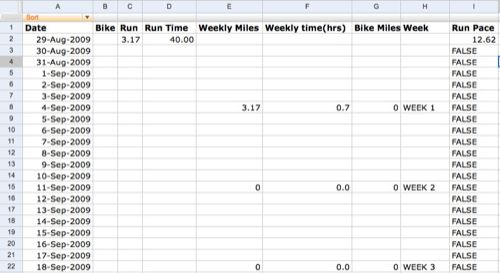
This is just the data; I have another sheet that is just the table for the weekly totals of miles and time spent running; from here I can simply use Google’s built-in Publish Chart which provides a URL to embed this graphic:
This is subtle but powerful– this is an image, but not an image- as the data changes, so will the graphic. So I know longer have to manually make a graphic and upload it to my web site; I can simply use the HTML
The other piece uses Google’s ability to publish a worksheet as CSV- this is data you can then parse on your web site. So I have a sheet that simply does averages/totals for my running log:

To access this data, I click the Share button and select Publish As Web Page

The options in the top make it so the published data is made current whenever I request it; in the bottom I select the option to have it published as CSV (comma separated value), and I select just the spreadsheet I need.
Thus, this URL always gives me the data on the spreadsheet in a form I can use in my code…. this bit takes some PHP savvy to manage, but I use the same logic almost everywhere.
 I use this on the sidebar of my blog to display an up to date listing of my totals. In my WordPress sidebar, I use a statement to bring in the code from an external file named totals.php that sits inside my theme directory:
I could have simply inserted the code into my sidebar template, but going modular like this makes it easier to separate code from format…
The basic logic is using the php file command to read int a remote file, which puts the contents into an array; where each array item is one line of data.
// get the CSV data as an array from the remote URL
$lines = file('http://spreadsheets.google.com/pub?key=tMIPDwydKpay-5Oq0_G769w&single=true&gid=0&output=csv');

// get rid of header row
$headers = array_shift($lines);

// Loop through data- therer is only one line hear
foreach ($lines as $line) {
	$ldata =  explode(',', trim($line)); // split row to its own array of elements

	if ($ldata[0] == '') break; // an empty line means we are done, so exit the foreach loop

      // now we can just output the information as an HTML list, referencing the appropriate array items
echo 'And what is cool is there does not seem to be much of an impact of hitting Google each time. It must be ‘a caching. Good stuff.
This is pretty simple example. I am running some more complex examples on the NMC Virtual Worlds site where the reason to do this was to have a larger amount of tabular data be displayed in a more readable fashion on our web site– and to make it so someone other than me can be in charge of keeping the data up to date bu simply editing a Google doc (note that a spreadsheet used for this purpose must be public viewable, so don’t mix in any company secrets in there).
So for example, our Clients listing is coming from a google spreadsheet, and the parsing tests the existence of certain items to format the output– e.g. if the organization URL column has a value, we echo the name as a hyperlink; if we have the coordinates of their land in Second Life, we add a teleport link. The code that generates this page also sorts it on output.
This one technically is not hitting the spreadsheet every time…. I set this up so a unix cron (a timed script) calls every hour a PHP script which generates the formatted content as a text file on the web server, so the web page actually just reads it in via an include statement… this is a simple form of caching.
Another page has actually two chunks of data that are generated from different spreadsheets. Out current land availability page lists plots of Second Life land available from NMC for rental.

The main body content is a list of land with the output formatted around data in a spreadsheet. And the current land prices on the right side come form another sheet- this way we can make adjustments to the web page at any time simply by editing a spreadsheet, and never touch the web page- again it works like this:
- Every hour a cron script on the server calls a PHP script.
- The PHP script reads in CSV data, sucks it into an array (one line as an item), marches through items, and parses each item as an array representing the cells, and outputs the formatted as HTML to a small text file.
- The WordPress page simply uses an include statement to display the content (I use the Exec-PHP plugin to be able to run statements in a page).
I am thinking more and more how I can use this process….
Of course, this is all baby stuff compared to the masterful data wrangling by the Jedi Master Tony Hirst….
 Share this barking on social media
Wow, CogDog, again you’ve shown me the light. I never new that Google provided a persistent URL for spreadsheet data. Not only does this allow you to set up a site so that non-coders never have to worry about code (when the only dynamic content is data), but it also allows you to do your data manipulation in a spreadsheet rather than in a script, which to my mind is much clearer (more visual anyway). Thanks for the writeup.
Very cool – google docs can be very powerful. Simply way to publish data. thanks!
Thanks for the clear writeup, have you seen:
Exhibit where can use a google spreadsheet as the data source. This means you can use a form to gather the data, I did a wee test getting twitter folk to add info to the form. Exhibit does the hard work.
Now in 2014 Google will update the old Spreadsheets to the new Google Sheet. Thre is no way of going back or even keep the old Sheets.
The feature “Publish to the web” is changed to the worse. So how can the PHP code be changed to fit the new Google Sheets?
Not sure, I have not used this method in 5 years. Probably better ways to do it now with jQuery
Hi Alan
Thanks for your reply last year. At first I was disappointed enough so I couldn´t reply back. Not because of you but because of Google not putting back the optoion to publish data like it was on the old spreadsheet version. Hopefully… Maybe they will….
But just recently I found an interesting link which does work on the new spreadsheet. There are two minor details that differs, though.
1. The character ” is put first and last in the row and next to the comma. If I change your PHP code from
explode(‘,’
to
explode(‘ “,” ‘
Then the character ” will still remain only at the beginning and at the end of the row. Is it possible to also add another explode so it removes both commas and ” ?
2. Empty row is bit messed up. It should stop parsing new rows whenever there is an empty row, but here it will continue searching for populated cells all the way down within the selected range. And what´s even more funny is, is that if there are blank rows in between the next populated row, then the next populated row will discard the first column. It´s so strange I cannot describe it correctly.
But hey, if you are still up for it and you have some more time and energy to give, you could then please take a look?
I beleive I´ll find a javascrip method be too long and complex and I do not even know if you can detail and style each column seperately. Like you can now with the ldata[0], ldata[1] etc.
Here is the new link type which works on the new version spreadsheet.
https://docs.google.com/spreadsheets/d/YOUR_KEY/gviz/tq?tqx=out:csv&tq&range=a6:f20
If you first would like to see a working example then please do tell and I´ll send you a mail.
/Thanks in advance
Hi it´s me again.
I made some progress, allthough an ugly one …
The CSV output will look like this:
“Headline1″,”Headline2″,”Headline3”
“cell1″,”cell2″,”cell3″
So I made an ugly hack to remove the ” (hare foot) characters by editing the explode separator
{ $ldata = explode(‘,’,
to
{ $ldata = explode(‘”,”‘,
This will remove the hare foot and the commas together “,” but not the hare foot that are seperate, like before Headline1 and after Headline3, same for cell1 and cell3.
To remove the “lonely” hare foot you have to include dummy columns before and after the data and exclude the first and the last ldata number .$ldata[0]. and .$ldata[4] or whatever the last column might be.
About the empty lines…. perhaps not much one can do since the empty lines are actually removed in the CSV output itself.
This is a workaround till maybe… just maybe… Google might actually add the publish to CSV data with range attribute in the final version before Old Spreadsheets are converted.
I know of no other service that can offer the same effective and easy solution to update data from an online Spreadsheet/Excel on a web page with just a simple code snippet.
That is why I really love your PHP work.
/Thanks
Hi Dan, I really do not even remember what I was talking about, so I had to re-read my post.
If I was doing this again, it would probably be easier to learn some of the functions to call spreadsheet data directly, or ways to request it through json. You can always count on google changing the architecture.
Hi Alan
Thanks again for replying and also for your patience with me 🙂
Good thing our last conversation wasn´t long, hehe
yea, you refer to javascript coding again…
I think you either underestimate the simplicity and how versatile your PHP code really is…
OR
I just do not see the full potential with using Json.
I came across this Json example page from google. It was the best I could find and still far from your code :p
https://developers.google.com/gdata/samples/spreadsheet_sample
…Direct link to the iframed page…
https://google-developers.appspot.com/gdata/samples/spreadsheet_sample_dcac35b605812838364d7fa6983a55e9.frame
If you look at the sourcecode it is huuuge. Only defining the html output to DL (definition list) is longer than your whole PHP code.
With your method I can wrap any html code around each column cell “ldata=0” and the next column cell “ladata=1″ and so on, any where and in any order i want.
Example 1 (the old fashion table style)
echo ‘
‘.$ldata[0].’
‘.$ldata[1].’
‘.$ldata[2].’
‘;}
Example 2 (UL, unordered list in another order. Column 3 first, then 1, then 2.)
echo ‘
‘.$ldata[2].’
‘.$ldata[0].’
‘.$ldata[1].’
‘;}
Example 3 ( images! )
echo ”.$ldata[2].’ ‘;}
Tons of examples can be made, all data drawn from one and the same spreadsheet document… on top of that, you can even specify, not only a different tab, but also a range of cells directly inside the spreadsheet link so you can have sections of data in one sheet tab alone spanning hundreds of rows.
This sounds like a commercial almost, but if Json can make all this possible with only 2-4 lines of code (excluding html markup) then you have my attention :p
So far, though, I haven´t found anything pointing me to that direction.
Ahh, bummer. the html markup was totally filtered. Trying again and replacing with brackets.
Example 1 (the old fashion table style)
echo ‘[tr]
[td]’.$ldata[0].'[/td]
[td]’.$ldata[1].'[/td]
[td]’.$ldata[2].'[/td]
[tr] ‘;}
Example 2 (UL, unordered list in another order. Column 3 first, then 1, then 2.)
echo ‘
[li class=”first”]’.$ldata[2].'[/li]
[li]’.$ldata[0].'[/li]
[li class=”last”]’.$ldata[1].'[/li]
‘;}
Example 3 ( images! )
echo ‘[img src=”‘.$ldata[0].’.jpg” alt=”‘.$ldata[1].'”][br][span class=”caption”]’.$ldata[2].'[/span] ‘;}
Hello again. Sorry if I appear to be a spammer 🙂
But I am a bearer of good news.
I have received some tips to use FGETCSV instead which appears to be a proper CSV parsing library.
http://php.net/manual/en/function.fgetcsv.php
The original code looks like this:
[?php
$row = 1;
if (($handle = fopen(“test.csv”, “r”)) !== FALSE) {
while (($data = fgetcsv($handle, 1000, “,”)) !== FALSE) {
$num = count($data);
echo ” $num fields in line $row: [br / ]\n”;
$row++;
for ($c=0; $c < $num; $c++) {
echo $data[$c] . "[br /]\n";
}
}
fclose($handle);
}
?]
Originally it will ouput all cells data on each row and calculate how many entries there are in each row.
First I tried to edit your code but then realised it was way over my head since I have no PHP skills at all.
….but….
Then I thought of doing the other way around. Removed the unnecessary output and used a small fraction of your code to output each column cell data into an array.
So now it looks like this:
[table]
[?php
$row = 1;
if (($handle = fopen("file.csv", "r")) !== FALSE) {
while (($data = fgetcsv($handle, 1000, ",")) !== FALSE) {
if ($data[0] == '') break;
echo ' [tr]
[td]'.$data[0].' [/td] [td]'.$data[1].' [/td] [td]'.$data[2].' [/td]
[/tr]
';
}
fclose($handle);
}
?]
[/table]
Works well with Google New Spreadsheet.
Two minor issues. I could not correctly implement the headers array_shift to skip the first row.
Secondly. The new Google Spreadsheet CSV link discards empty rows. So there is no way to stop generating another piece if data section a couple of roows below. But lucklily one can specify a range of cells directly in the link.
If the above PHP code can be improved even more, if possible, then I wuold be impressed. Otherwise it looks compact already.
Like, there are some values I do not quite understand, especially $handle, 1000. I notice if I put 10 the ouput will be very cut off, and 11 will put more data, if not all, I see no logic 🙂
This is how you learn to code, trying and retrying. I suggest making use of the php documentation, it explains the fgetcsv function
http://php.net/manual/en/function.fgetcsv.php
$handle ends up being a reference for the file once it is opened via fopen — that function says “open the file and call it $handle”. You have to tell fgetfsv what to work with, so yo say “work with that $handle thing”. Leave the 1000 alone, according to the docs it just needs to be a number larger than the amount of data in characters you expect to get per line. That’s what 10 or 11 do not work.
There are a number of tricks you can do to have it skip the first row. Like before the while statement, put
then inside the loop, right after the while put something like:
if ( !$headersfound ) {
  $headersfound = true; // we found headers
  continue; // skip this loop
}
It just plays a trick the first time through the loop and skips all of the statements below, the next time through, it iterates as expected.
The reason it stops on empty lines is because of thee statement:
Code on