
Welcome back to an old song around here, the ideas and ways of giving attribution when reusing the creative works of others. My approach is ABA, Always Be Attributing.
The hyperlink is perhaps the simplest and easiest way, as perhaps it might be coined by some weirdo as “linktribution” (yet one more stillborn neologism).
But I am talking about (soon as I stop tangentalizing) about attribution for openly licensed works. I spotted a question in the CCCOER Community of Practice email list
I usually give my students the link to the attribute builder but the link is not active any more. It there a new link I can share with my students when we are covering creative commons and open educational resources?
(Aside, this is a case where a hyperlink / URL would have been helpful, eh? what “attribute builder” are they referring to? Always Be Linking, eh?)
My hunch is they are referring to Open Attribute (wayback link) that was once living at openattribute.com created back in 2011 at a Mozilla event. I think it worked by detecting Creative Commons license metadata embedded in a web page -the demo there used flickr which at least they still provide, for the small number of people out there who actually view source.
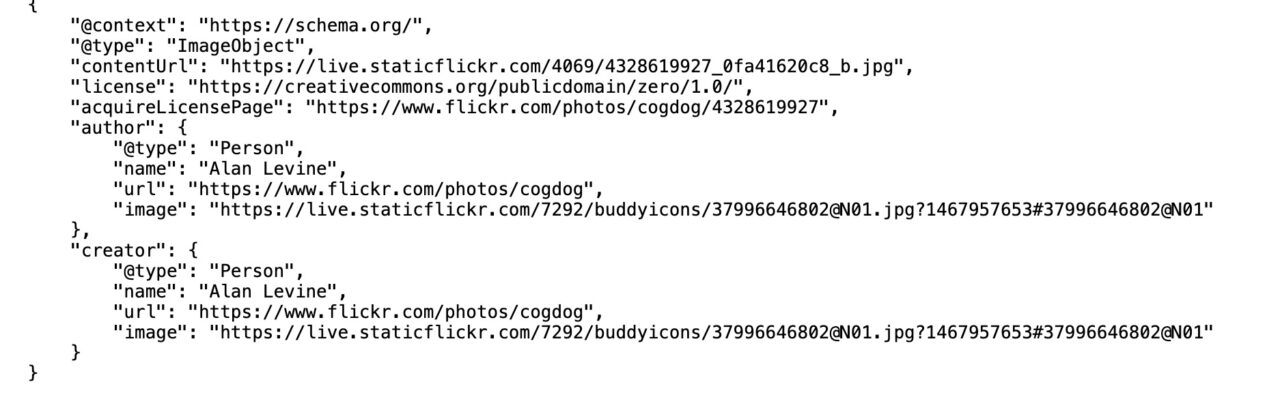
Its essentially all the information needed to create the Creative Commons TASL Best Practice form of attribution Title, Source (with link), Author (with link), Licences (with link).
Of course that was dependent on web publishing systems actually inserting such metadata in their pages, which is not always done. Plus we have so many more variants than the stock set of CC licenses (also while dated 2015 the booklet Guide to Open Content Licenses by Lawrence Liang is extremely well written). And then, even just for images, you have outfits like Pexels, Pixabay, Unsplash making their own variants of licenses.
So its messy, and metadata will not save us.
Back on the CCCOER discussion list (heck, email lists are still valuable, right?) someone mentioned the Open Washington Attribution Builder pretty much a fill out the form and get an attribution text you can use.
Let’s Use the Open Attribution Builder!
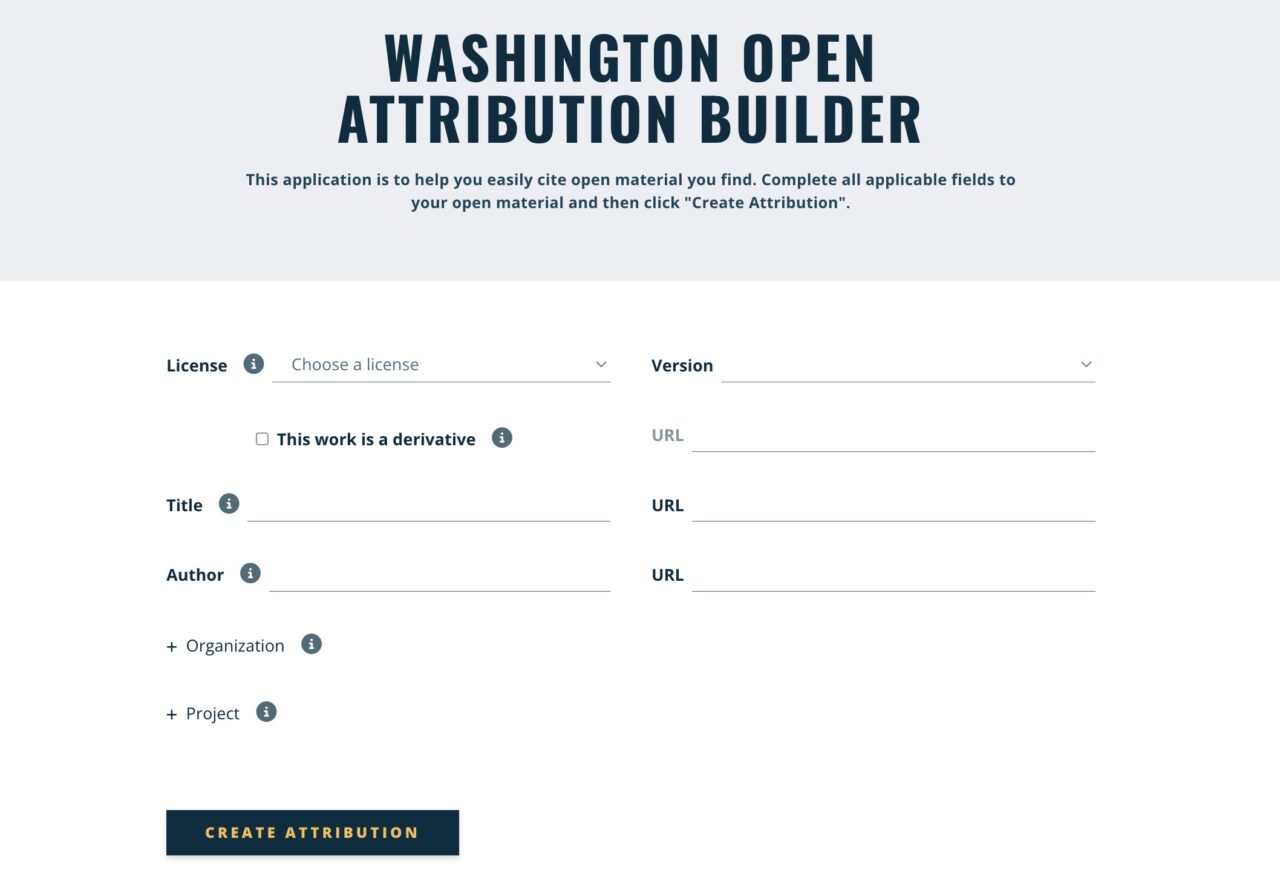
It looks sensible. A menu choice of licenses, and other appropriate fields one one need. That’s it, done, right?
Well except. I decided to walk through the process to build an attribution for a Pressbooks title, rummaging around Pressbooks Directory I found +JUNTXS a book on Intermediate Spanish from the University of Queensland (how global is that?).
Now here’s where it gets not fun. The process of getting the information from the source to the Attribution was several browser window round trips to copy/paste info
- go to the source, note the license
- go to attribution builder, Select license from menu
- go to the source, copy the book title
- go to attribution builder, paste in the title field
- go to the source, copy the URL
- go to attribution builder, paste in the URL field
- go to the source, copy the author’s name
- go to attribution builder, paste the author’s name field
- go to the source, look for the organization, I can see it is University of Queensland, no copiable text, but my memory is good
- go to attribution builder, type University of Queensland in the organization field
- go to source, hmm, no URL for University of Queensland, several more steps to search, find thw university’s web site, copy
- go to attribution builder, paste organization link in URL field (I am not sure how/why this is used, but I am being diligent
Now I am ready, right?
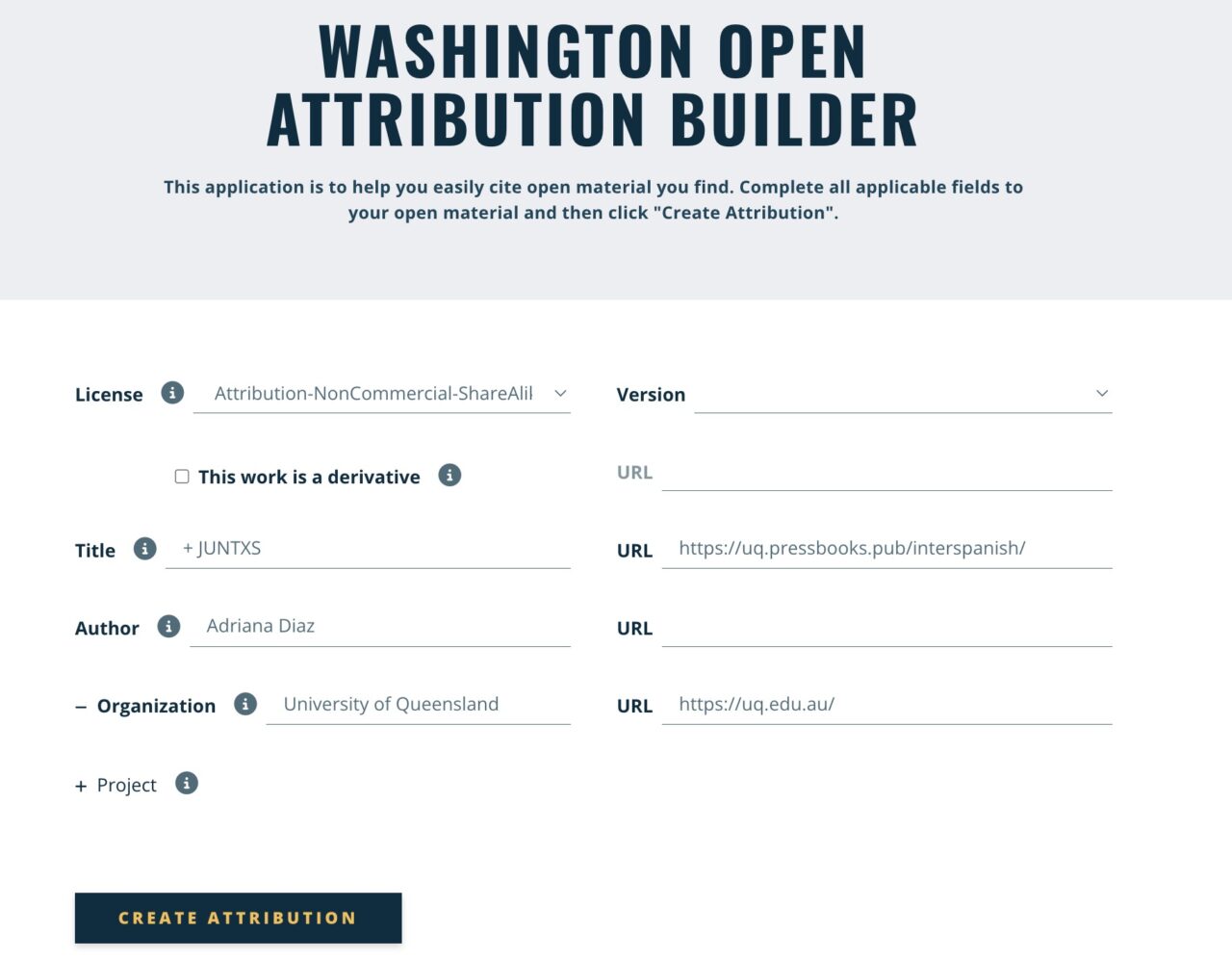
I can now create the attribution, check it out!
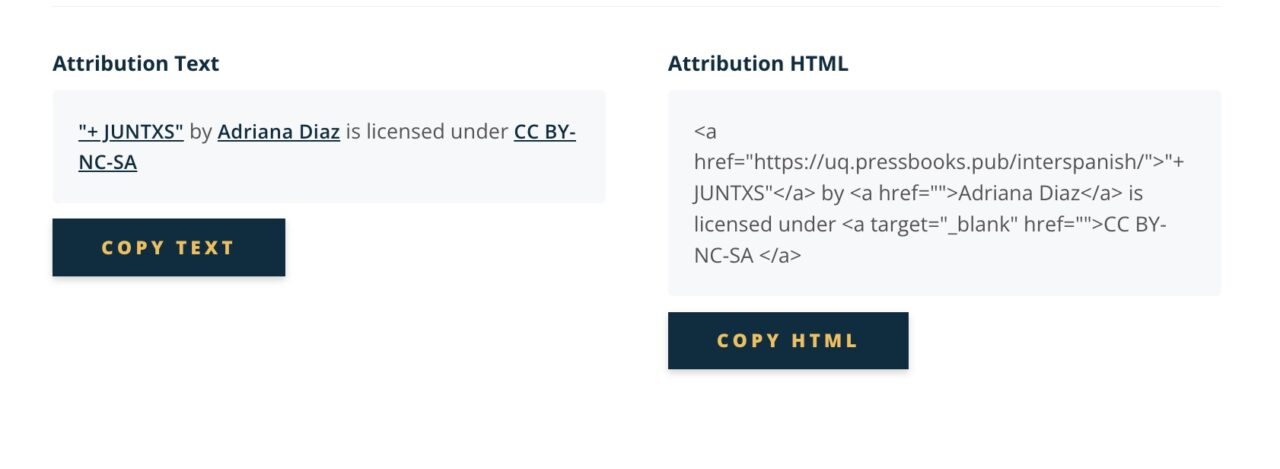
It looks spiffy, right? Well not quite.
Neither of the Copy buttons actually copy. Peeking in my browser console, I can spot javascript errors. But still I can copy that text manually.
“+ JUNTXS” by Adriana Diaz is licensed under CC BY-NC-SA
I’m done! right?
Hold on, there. Look back to the screenshot of the Attribution HTML. I can see problems:
- There is no URL on the hyperlink for ther author. That is because I did not find one, so the field was blank. Ideally, if there is no URL for the author, the attribution should not render it with a hyperlink, as is it links to the Attribution Builder!
- Also, there is no link for the license. I can guess there is some faulty form logic, as it should be able to look up the list of URls for CC licenses from, some array, and link it.
In the end, I spent lot of time going back and forth to this form, and what the form rendered was not even worth the effort.
Why Use a Form When You Could Just DIY?
If you are going to the source to get all this info, why do you need a form to build the attribution? What is this teaching about how to do attribution? Isn’t this a case of giving someone an attribution fish rather than teaching them to go fishing? I’d rather people know themselves the important elements of an attribution, TASL is not really anything you need a tool to assemble. All the info you need is on the source, why spend your time copy pasting into some form when you can just build the attributiuon where you need it?
Let’s go!
+JUNTXS is an open access educational resource which can be used in conjunction with a variety of approaches to support intermediate learners of Spanish. This media-rich learning resource is designed to guide learners in their Spanish language learning journey through a critical and intercultural lens and to provide regular opportunities to explore, practice and improve their ability to read, speak, and understand this language as it is used across the Spanish-speaking world.
+ JUNTXS by Adrian Diaz is licensed under a Creative Commons Attribution-NonCommercial-ShareAlike 4.0 International License
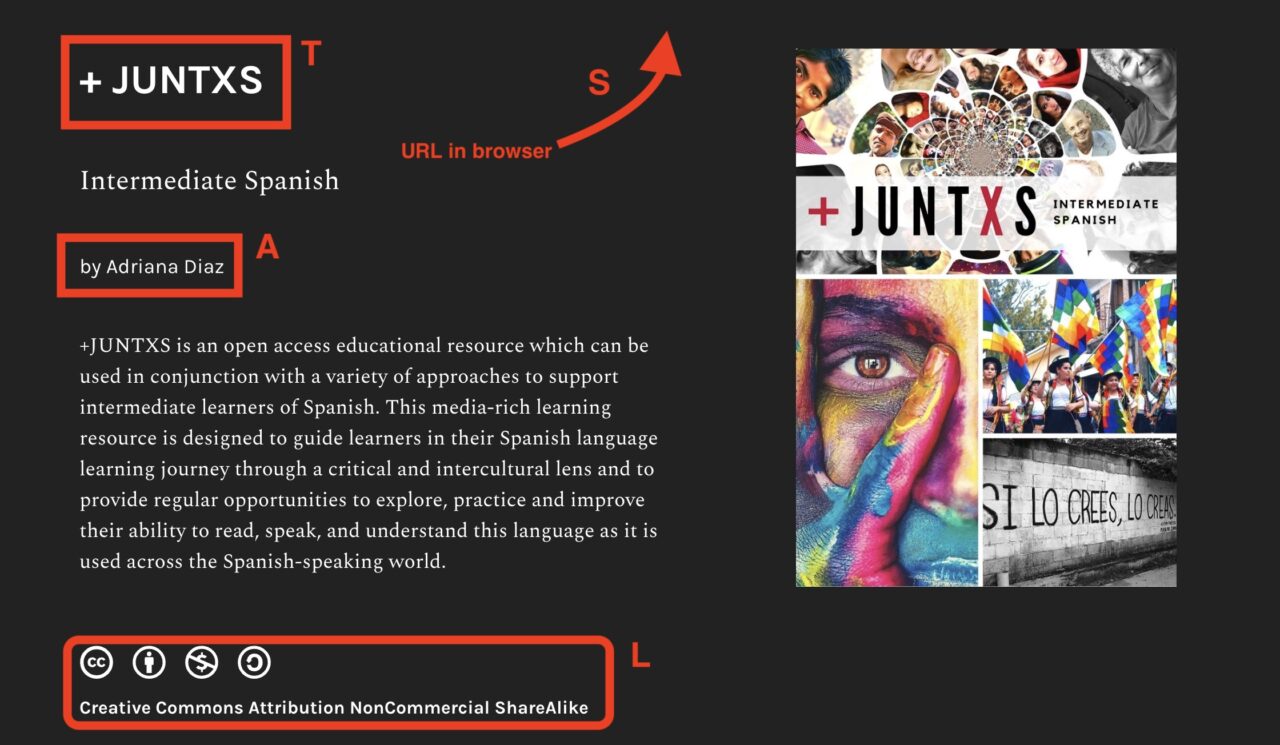
I was able to do that in 4 trips to the Pressbooks source. I have never noticed by the title page at the top states the license, but it is not linked. Weird. But if I go to the footer that is on every page in the Pressbook, every thing is there, copiable, and I could actuallt get everything in 3 trips since copying the title brings along the link, and copying the license text brings along its link.
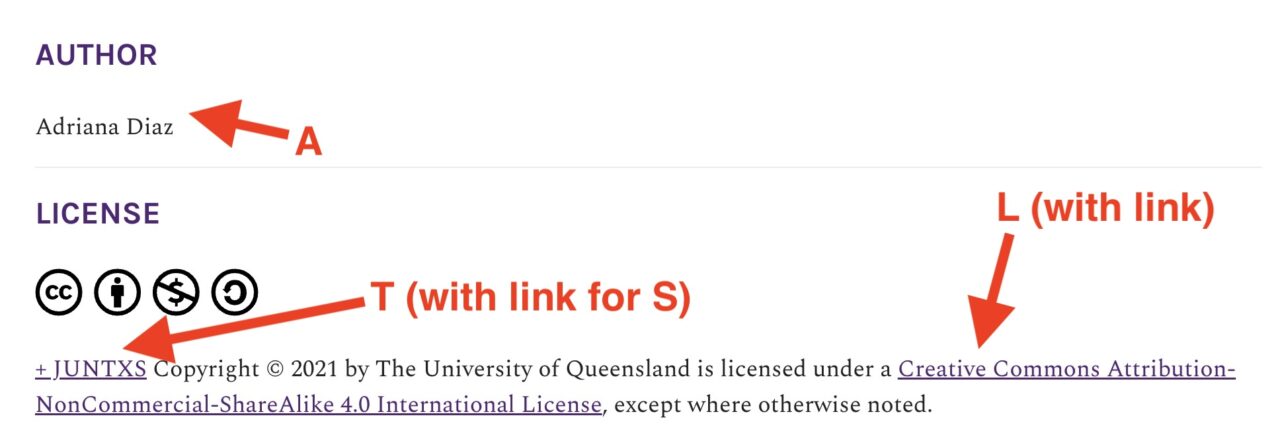
I leave it for another day to ponder why Pressbooks does not output a TASL attribution, but shrug.
It Does Not Have to Be So Tedious
Heck, this entire tedium was the reason back in 2009 I first made my Flickr CC Attribution Helper, something I use still almost daily to get cut and paste attribution for Creative Commons licensed flickr photos. It’s a one trip operation to get a fully formed TASL.
Of course, it’s limited to doing attribution for flickr photos. I have had thoughts about recoding it to manage a few more sources, but to be honest, its just complicated as the data provided by different sources is not easily grabbed via javascript. There is, if anyone is interested, an attribution generator for Wikipedia and Wikimedia Commons.
But just staying with images, what about Pixabay? And Unsplash? Pexels? And all those other gobs of open[ish] images?
Okay I hear you, “but Alan, Unsplash provides a copy/paste attribution” It does, but, well walk along with me. I will start searching Unsplash for images for the keyword… share. I might go for the one of the hands holding the bowl of tomatoes.
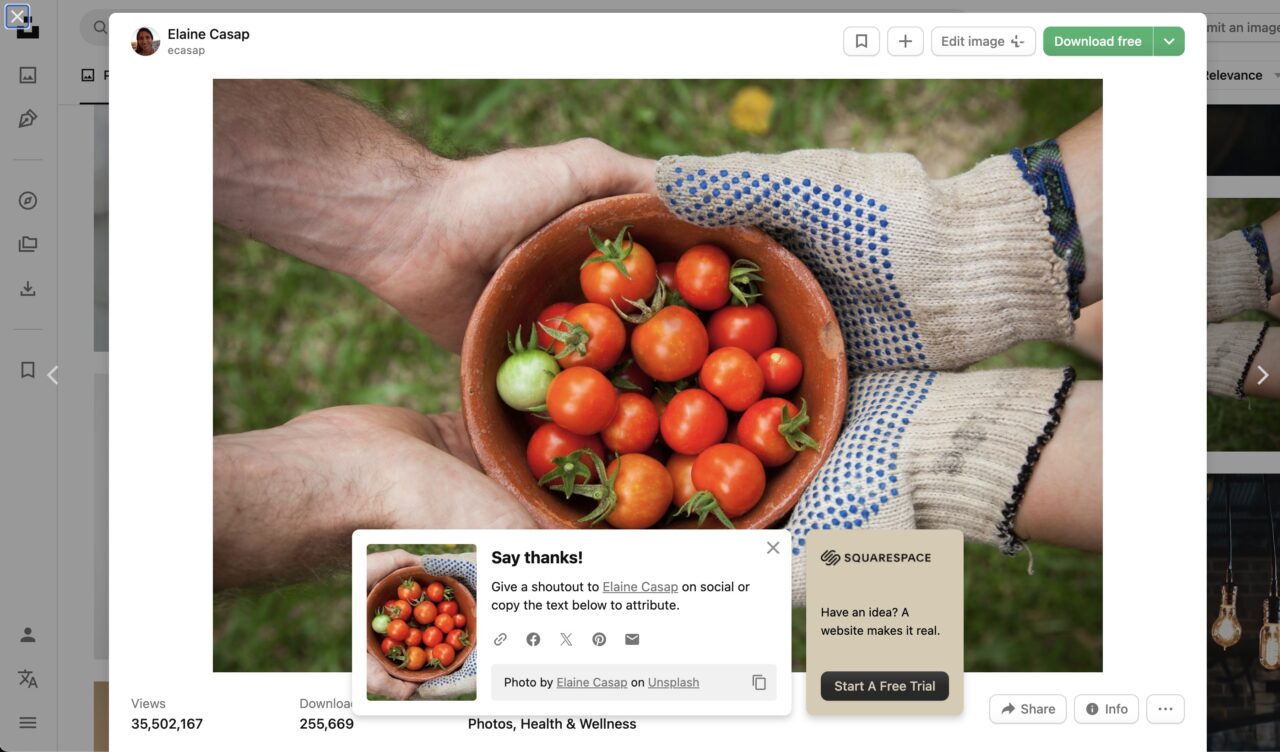
Look! It has an attribution right there I can copy. And looks it has ads. Sigh. Okay here is the copy/paste attribution:
Photo by Elaine Casap on Unsplash
Running down the TASL list I get… well A (author and link, good), and… S (linked from Unsplash). The info is all there, on the photo’s page.
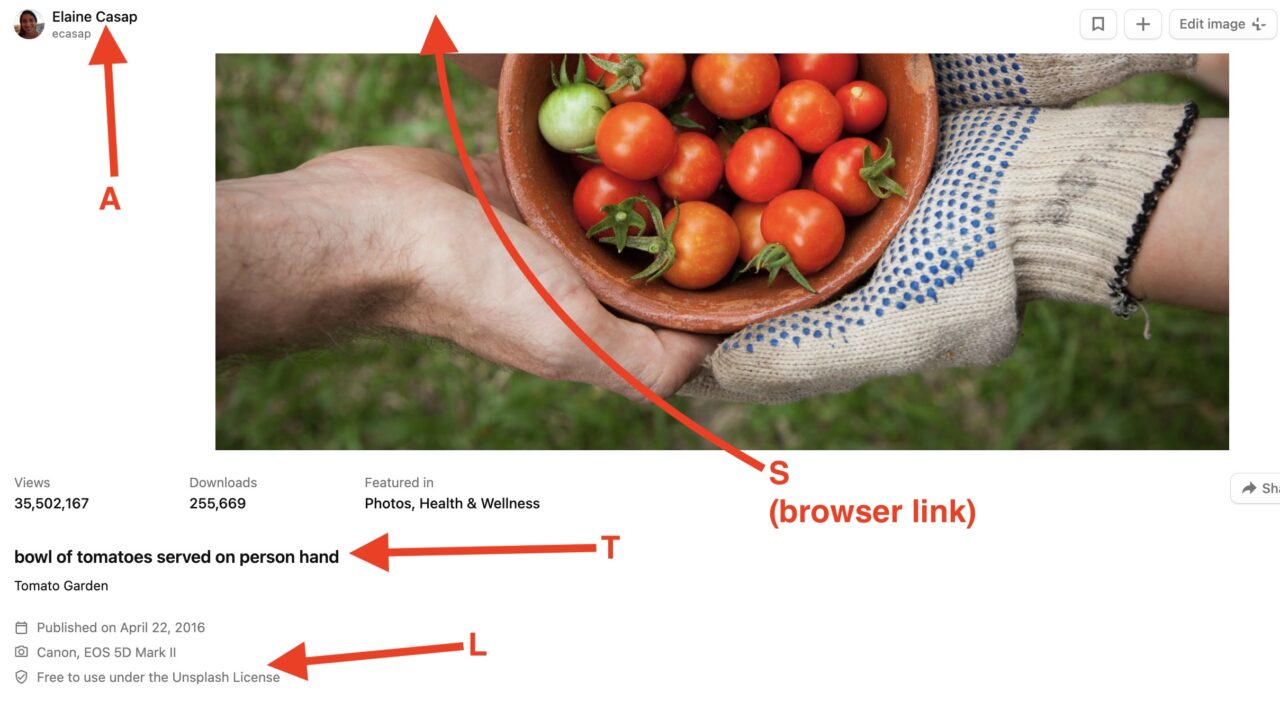
Unsplash has it’s on license, there with a link. So if I use this image, I download it, put it my page/project, and do my own round tripping to manually TASL it fully.
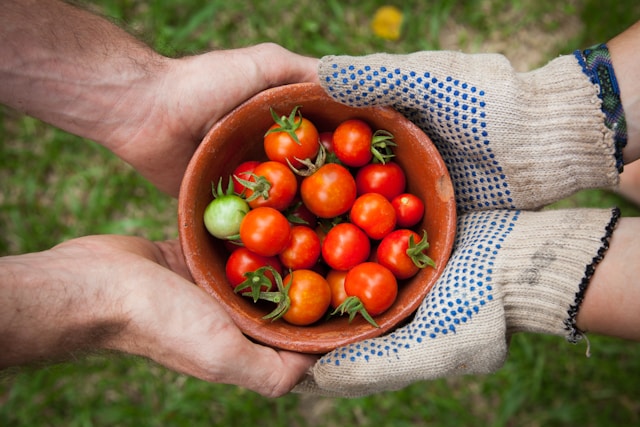
It’s still a few trips, but I have a full TASL attribution. My own practice is to indicate the site that provides the image “Unsplash photo” to me that is much part of source.
And still, there’s no authority on attribution, TASL is not a law, just a suggested best practice. To me, th only wrong way of attribution is not attributing.
Just an Idea: Zotero
I was pondering the ideal tool, that like the original Open Attribute that could make the process not so many round trips of copy paste, somewhere my mind went back to Zotero the open souce tool for keeping track of research sources, but also one that generates bibliographies in various sources.
I knew of Zotero by hame back to interactions with CHNM at George Mason University but put it to more use when I taught an MA thesis class at Kean University 2017-2018. I had students set up their own collections and we had a shared group library. When I saw and shared how easy it was to add a paper, resource to your library from its web address with one click, I saw the spark.
I have to admit I’d not kept up much with using Zotero since, as much as I dig adding references to Pinboard I think I should have been or should be keeping paper references in Zotero. After showing it to my wife Cori for her university classes, she has become a proponent of it, enthusiastically urging her colleagues to be using it as well.
Since Zotero was able to grab much information from a resource at a URL, I started digging to see if anyone had thought about it for attribution, especially after coming across to Citation Style Language and besides the usual APA, MLA et al, there are 10,000 CSL variants, all which work with Zotero. Then I started seeing the notes about how to edit and create your own CSL style, it’s just a kind of markup language.
May appear once. The contents of
cs:rightsspecifies the license under which the style file is released. The element may carry alicenseattribute to specify the URI of the license.
but is it used? How?
As usual others have been ahead of me, I spotted a request in 2017 with concern on Zotero’s front about concerns of “mission creep” and then I found more questions/discussions on making use of this in the Zotero forums from 2020-2022. It seems like some sources send data to the rights field, but you can’t count on it.
My top of the head thinking is that maybe one could manually add a license statement after adding an item, maybe that’s a one round trip extra step. At least then, matbe I could experiment with the CSL structure to see if I can make something that returns TASL style.
I started making my own ABA Zotero collection and added a few items, flickr photos, YouTube videos, OER from OER Commons, an OEG Voices podcast episode, plus the Unsplash photo and the +JUNTXS Pressbooks mentioned earlier.
For +JUNTXS it adds everything except a license.

The Unsplash photo metadata grabbed though needs some work, as likely the layout of Unsplash photo pages is not quite designed for this kind of discovery.
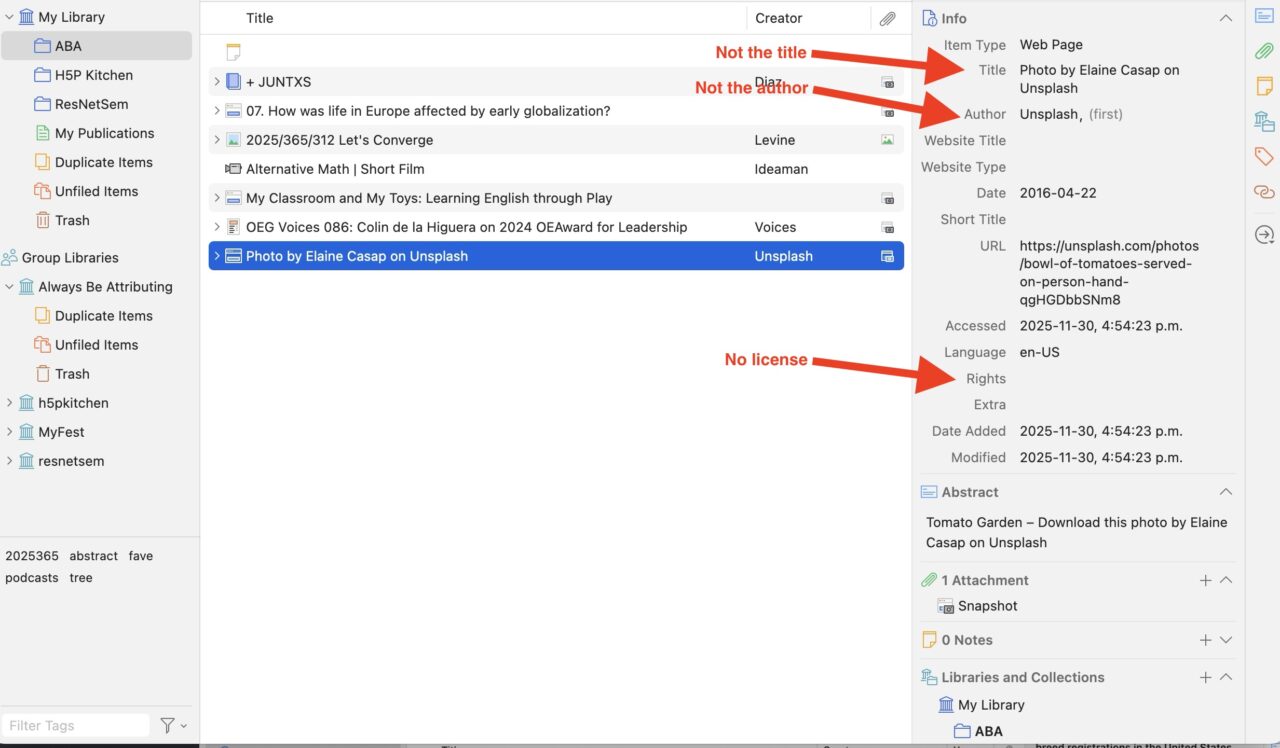
I can move somethings around in Zotero, move the creators name from the title given to Author, and make the web site title Unsplash. I go back to the source to find the image title, a little browser inspreact shows that “bowl of tomatoes served on person hand” is marked by a CSS element including “title”, the sub text “tomato garden” is in an element indicating it is a description. I also copy the “Free to use under the Unsplash License” to the Zotero rights field.
So it still takes some work. But much info Zotero got directly from the web pages for both of these items.
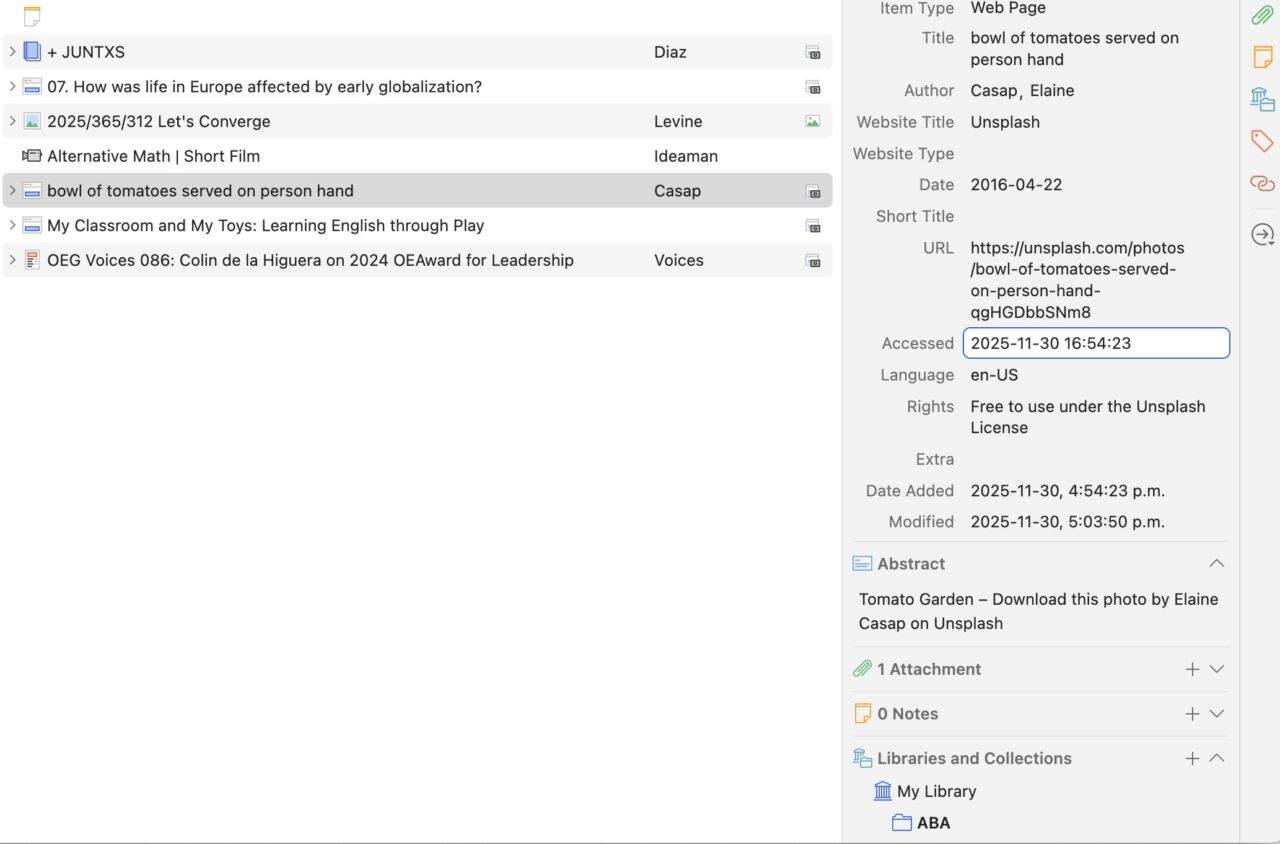
It remains a blog post for another day to see if I can come up with a CSL for doing attributions. Just for the heck of it I am adding the ABA items to a publicly viewable group library called Always Be Attributing.
So What?
What came to me as I was playing with Zotero was how valuable it might be to keep a library of open resources. If I do a one off attribution statement, through my manual method or by say the Open Washington Attribution Builder, and add it to my resource… to reuse it, I have to go back and find where the hek I did it.,
But in a library like Zotero, if I can have it export an Attribution statement, I could easily redo them, maybe not needed for my typical use in a blog post or a discussion forum post. But if I was working on say a project like an open textbook, imagine how useful it is to have a collection of all media/resources in one place? Where collaborators could access it? One could create attributions for the entire project?
I have no idea of this Zotero route is viable, but in just a little bit of play, I feel it has some attribution legs. If that is a thing.
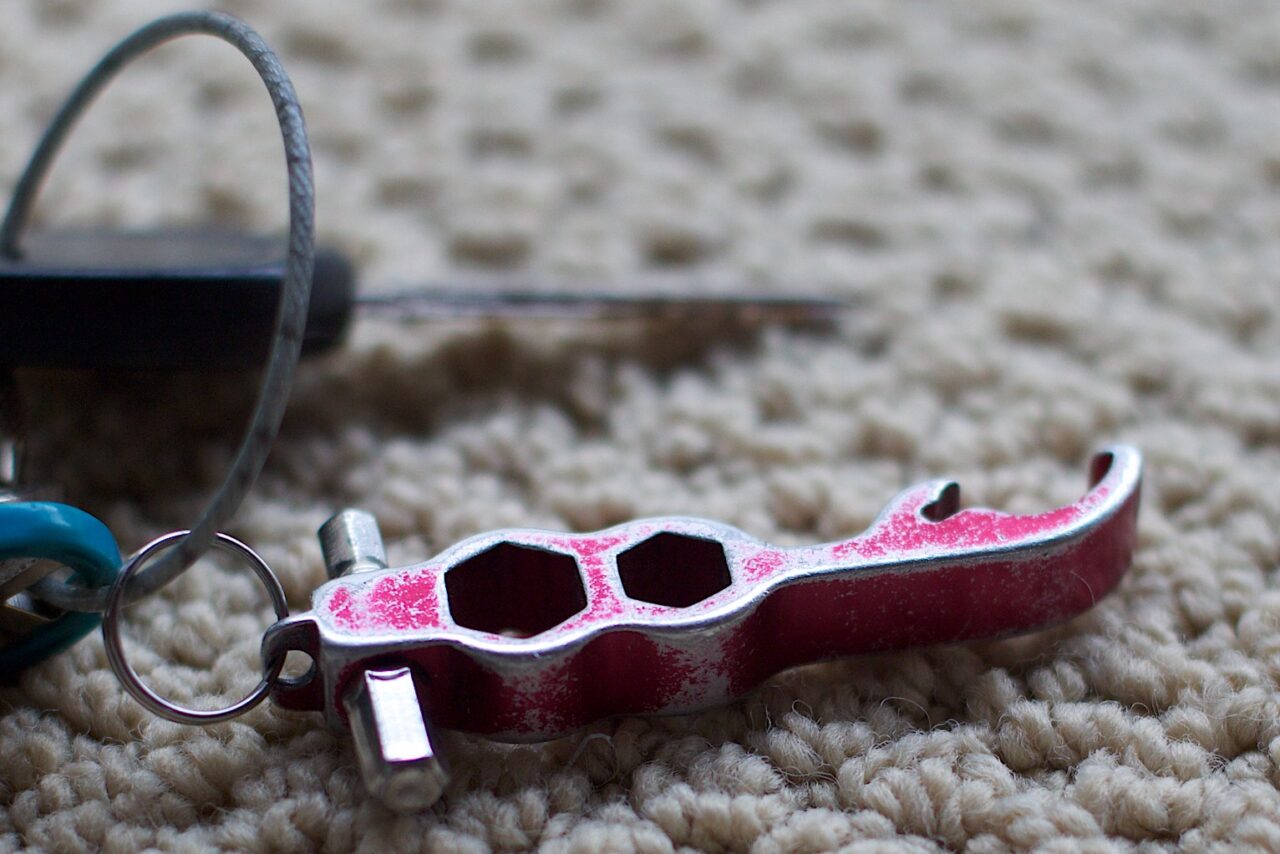
Featured Image: Maybe my favorite tool of all times, a well work bicycle multi tool whose name/origin I long forgot. Key Tool flickr photo by cogdogblog shared into the public domain using Creative Commons Public Domain Dedication (CC0) Attribution made in one click with flickr cc attribution helper which I use easily 3 times a day.


I love a good attribution romp! Also love Zotero as I use it all the time, mostly as sort of like a social bookmarking tool (remember Delicious?). It would be a great way to keep a running catalog of works one — or a collaboration — is attributing.
A combo of Zotero to grab info, modifying it manually if needed, and output in WordPress sites using the awesome Zotpress plugin seems like a great combo, especially with the right CSL for formatting.
I’ll also point to another tool that might help with such license formatting and could handle Zotero dumps, especially in bulk. Alan already contributed to the Bulk Open Attribution Tool (BOAT): https://xolotl.org/jupyter-boat/
OMG how did I forget about the BOAT? https://xolotl.org/boat-1-0/ And right there in our comment conversation you suggested my idea I spat out here. https://xolotl.org/boat-1-0/#comment-219377
I am kind of itching now to see how to put CSL into action. I am thinking too that the open ended entry of a license in the rights field, allows one to include any kind of licenses/rights statement. It’s too limiting to just have the options as the Holy 6 CC versions, this does not match what goes on in the world.
There is something there too about having in the spreadsheet not only the attributions but a reference to all media/sources used in a project.
Thanks Nate!